
Screenshots


App details
- Updated
- August 29, 2014
- Requires
- Windows, Windows XP, Windows Vista
- Developer
- Corel
- Category
- Mobile
SoftPas in:
This product is also available in the following languages:
About Ulead DVD MovieFactory Pro
Download Ulead DVD MovieFactory Pro – DVD creation software, DVD menus, photo and video editing, media format support, family and friends sharing, Corel integration, professional-quality DVDs, creative tools
Overview
Ulead DVD MovieFactory Pro, now known as Corel DVD MovieFactory 7, is a dedicated DVD creation software designed to help users transform personal photos and videos into polished, shareable DVDs. The application focuses on simplifying the process of creating professional-quality DVDs, making it accessible even to users with minimal technical experience. Its core purpose is to enable individuals to preserve and share cherished memories in a format that’s both durable and universally viewable on standard DVD players.
Target users include families, amateur videographers, and individuals looking to archive personal events such as weddings, birthdays, or travel adventures. The software is particularly valuable for those who want to distribute physical copies of their content to relatives or friends who may not have access to digital streaming platforms. By offering a structured workflow, it reduces the complexity often associated with DVD authoring, allowing users to focus on creativity rather than technical hurdles.
As a product of Corel, the application benefits from integration with other creative tools within the Corel ecosystem, although specific details on this integration were not provided. The software supports a wide range of media formats, ensuring compatibility with various video and image files without requiring prior conversion. This adaptability enhances its utility across different user workflows.
Within the broader app ecosystem, Ulead DVD MovieFactory Pro fills a niche for offline, high-quality media distribution. While digital sharing is prevalent, physical DVDs remain a preferred medium for long-term archival and gifting. The software’s emphasis on menu design and user-friendly navigation positions it as a practical solution for those who value both aesthetic appeal and functional simplicity in their media projects.
Key Features & Functionality
- Intuitive DVD Creation Process: The software guides users through each step of DVD authoring, from importing media to final burning, using a streamlined interface that minimizes technical barriers.
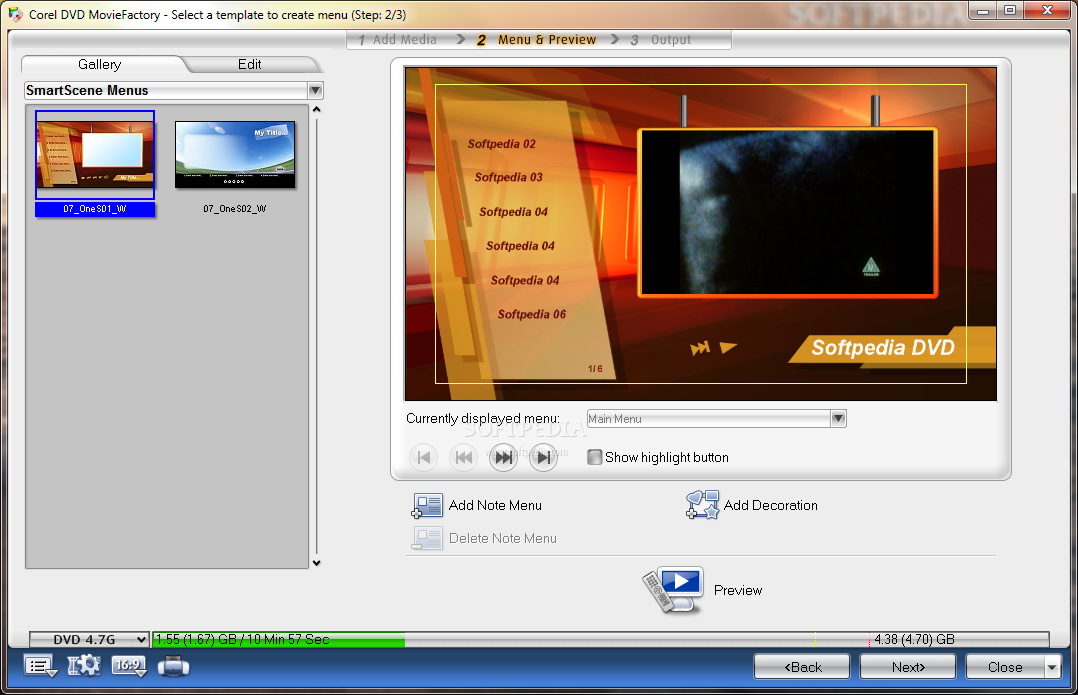
- Stunning Menu Design Tools: A library of pre-built menu templates allows users to create visually appealing navigation screens, with options to customize colors, fonts, and layout to match the theme of their content.
- Comprehensive Media Format Support: Users can import various video and photo formats directly, reducing the need for external conversion tools and saving time during project setup.
- Easy Sharing Capabilities: Once a DVD is created, it can be burned to physical discs and distributed to family and friends, making it ideal for gifting or long-term storage.
- Seamless Integration with Corel Products: The application works in tandem with other Corel software, enabling users to leverage advanced editing tools for enhancing media before importing into the DVD project.
For example, a user preparing a birthday tribute can import video clips and photos, apply a custom menu with a festive theme, and burn the final product to a disc for a physical gift. Another use case involves a travel vlogger compiling footage from multiple trips into a single DVD with navigable chapters and background music. The software’s ability to handle diverse media types ensures that users aren’t limited by file format constraints.
Interface, UX & Performance
The user interface of Ulead DVD MovieFactory Pro is structured around a linear workflow, with clearly labeled steps such as “Import,” “Edit,” “Design,” and “Burn.” This layout supports intuitive navigation, allowing users to progress through the DVD creation process without confusion. Visual cues and tooltips help guide users, especially those unfamiliar with DVD authoring.
Menu design is visually rich, with drag-and-drop functionality for placing elements like buttons, background images, and video previews. The customization options are accessible through a sidebar panel, ensuring that users can adjust settings without disrupting the main workspace. While the developer did not provide specific performance metrics, the application appears to maintain responsiveness during media processing, particularly on devices with moderate to high processing power.
Stability during the burning phase is crucial, and the software handles disc writing efficiently, though the exact time required depends on the length of the content and the speed of the connected burner. Although the developer did not list formal performance metrics or device compatibility details, the application is designed to function across standard desktop environments. Users are advised to ensure their system meets the necessary hardware requirements for smooth operation.
Platform Compatibility & Technical Requirements
Ulead DVD MovieFactory Pro is available for desktop platforms, specifically designed for Windows operating systems. The software requires a compatible DVD burner for disc creation, which is a standard peripheral on most desktop computers. The application’s file size is not specified in the provided information, but it is typical for such software to require several hundred megabytes of storage space.
While the developer did not specify minimum OS requirements or software version compatibility, the application is intended for use on modern Windows systems. Users should ensure their system has sufficient RAM and processing power to handle video rendering and disc burning tasks. Specific requirements were not listed, so compatibility with older or newer systems cannot be confirmed.
Pros and Cons
Pros
- Intuitive interface suitable for beginners and intermediate users
- Supports a wide range of video and photo formats without conversion
- Offers professional-looking menu templates with customization options
- Enables physical distribution of media to family and friends
- Integrated with Corel’s creative suite for enhanced workflow
Cons
- Developer did not provide detailed technical specifications
- Platform availability limited to desktop environments
- Compatibility with older or newer OS versions not confirmed
- Requires a physical DVD burner for disc creation
- No cloud-based sharing or digital distribution features
FAQ
Is Ulead DVD MovieFactory Pro free to download?
The pricing information was not provided. Users should consult official sources for current pricing and licensing details.
Can I use this software on macOS?
The developer did not specify compatibility with macOS. The software is primarily designed for Windows-based systems.
What file formats does the software support?
Ulead DVD MovieFactory Pro supports a wide variety of video and photo formats, though the exact list was not disclosed in the provided information.
Do I need a DVD burner to use this app?
Yes, a physical DVD burner is required to create and burn DVDs. The software cannot generate digital files for playback without a compatible disc drive.
How often is the software updated?
Update frequency was not specified. Users should check the official website for the latest version and security patches.
Final Thoughts
Ulead DVD MovieFactory Pro, now Corel DVD MovieFactory 7, remains a reliable solution for individuals seeking to create polished, shareable DVDs from personal media. Its emphasis on ease of use, professional menu design, and broad media compatibility makes it a practical choice for families and content creators who value physical media distribution. While it lacks modern digital sharing features, its focus on tangible, long-lasting output ensures that memories are preserved in a format that’s both accessible and durable.
Users who prioritize creative control, visual appeal, and the ability to gift physical DVDs will find significant value in this software. Its integration with Corel’s creative tools further enhances its utility for those already invested in the ecosystem.
Download Ulead DVD MovieFactory Pro now
Guides & Tutorials
How to install Ulead DVD MovieFactory Pro
- Click the Download button above.
- Once redirected, accept the terms and click Install.
- Wait for the Ulead DVD MovieFactory Pro download to finish on your device.
How to use Ulead DVD MovieFactory Pro
This software is primarily used for its core features described above. Open the app after installation to explore its capabilities.
User Reviews
No reviews yet. Be the first to share your experience.
You may also like
more
Que no te pillen¡
About !Que no te pillen¡Reviewed by Jason A. BilbreyShow MoreShow Less

3D Combat Zone
About 3D Combat ZoneOriginally released in 1983, 3D Combat Zone immerses players...

666: El día del portal
About 666: El día del portalOn June 6, 2006, Agent P. Stone uncovers a sinister...

80 in 1 Best Flash games
About 80 in 1 Best Flash games 80 in 1 Best Flash games is a collection of 80 fl...

ABYSS SEEKERーーWhat Do You See Deep in The Abyss
About ABYSS SEEKERーーWhat Do You See Deep in The AbyssIn ABYSS SEEKER, players...

ACA NEOGEO THE KING OF FIGHTERS 2002 for Windows
About ACA NEOGEO THE KING OF FIGHTERS 2002 for WindowsTHE KING OF FIGHTERS 2002,...